# AdmissionWebhooks

## Overview

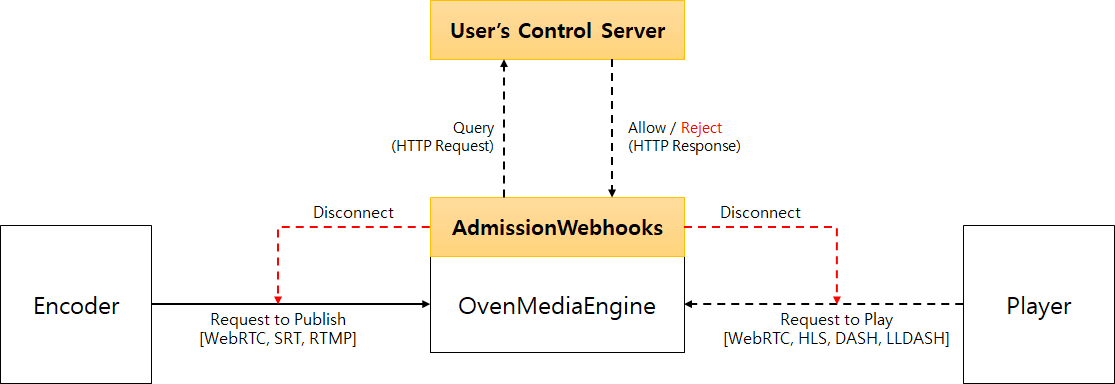
AdmissionWebhooks are HTTP callbacks that query the control server to control publishing and playback admission requests.

<figure><img src="https://content.gitbook.com/content/xo7moYXTh3yBG01Dy49w/blobs/kLt7WPfUxOvK9PkdNMKk/image.png" alt=""><figcaption></figcaption></figure>

Users can use the AdmissionWebhook for a variety of purposes, including customer authentication, tracking published streams, hide app/stream names, logging and more.

## Configuration

AdmissionWebhooks can be set up on VirtualHost, as shown below.

```markup
<VirtualHost>
	<AdmissionWebhooks>
		<ControlServerUrl>https://192.168.0.161:9595/v1/admission</ControlServerUrl>
		<SecretKey>1234</SecretKey>
		<Timeout>3000</Timeout>
		<Enables>
			<Providers>rtmp,webrtc,srt</Providers>
			<Publishers>webrtc,llhls,thumbnail,srt</Publishers>
		</Enables>
	</AdmissionWebhooks>
</VirtualHost>
```

<table><thead><tr><th width="290">Key</th><th>Description</th></tr></thead><tbody><tr><td>ControlServerUrl</td><td>The HTTP Server to receive the query. HTTP and HTTPS are available.</td></tr><tr><td>SecretKey</td><td><p>The secret key used when encrypting with HMAC-SHA1</p><p>For more information, see <a href="#security">Security</a>.</p></td></tr><tr><td>Timeout</td><td>Time to wait for a response after request (in milliseconds).</td></tr><tr><td>Enables</td><td>Enable Providers and Publishers to use AdmissionWebhooks.</td></tr></tbody></table>

{% hint style="warning" %}
If the Control Server does not respond quickly enough, AdmissionWebhooks may occupy a socket thread.\
In this situation, increasing `WorkerCount` can distribute the load across multiple threads, but other sessions sharing the same thread may still be blocked until the Control Server responds.

To avoid this issue, use the `ThreadPerSocket` option as shown in the example below.\
This option creates and assigns a dedicated thread for each socket connection, so one session will not block others.

Note that creating too many threads can increase context switching overhead. Therefore, this option is recommended only when the expected number of concurrent sessions is relatively small (typically fewer than 100 concurrent sessions, depending on the number of CPU cores)

```xml
<Bind>
    <Providers>
      <RTMP>
        <Port>${env:OME_RTMP_PROV_PORT:11935}</Port>
				<!-- <WorkerCount>8</WorkerCount> -->
		    <ThreadPerSocket>true</ThreadPerSocket>
      </RTMP>
```

{% endhint %}

## Request

### Format

AdmissionWebhooks send HTTP/1.1 request message to the configured user's control server when an encoder requests publishing or a player requests playback. The request message format is as follows.

```http
POST /configured/target/url/ HTTP/1.1
Content-Length: 325
Content-Type: application/json
Accept: application/json
X-OME-Signature: f871jd991jj1929jsjd91pqa0amm1
{
  "client": 
  {
    "address": "211.233.58.86",
    "port": 29291,
    "real_ip": "192.0.2.43",
    "user_agent": "Mozilla/5.0 (Windows NT 10.0; Win64; x64) AppleWebKit/537.36 (KHTML, like Gecko) Chrome/110.0.0.0 Safari/537.36"
  },
  "request":
  {
    "direction": "incoming | outgoing",
    "protocol": "webrtc | rtmp | srt | llhls | thumbnail",
    "status": "opening | closing",
    "url": "scheme://host[:port]/app/stream/file?query=value&query2=value2",
    "new_url": "scheme://host[:port]/app/new_stream/file?query=value&query2=value2",
    "time": "2021-05-12T13:45:00.000Z"
  }
}
```

The message is sent in POST method and the payload is in application/json format. `X-OME-Signature` is a base64 url safe encoded value obtained by encrypting the payload with HMAC-SHA1 so that the `ControlServer` can validate this message. See the [Security ](#security)section for more information on `X-OME-Signature`.

Here is a detailed explanation of each element of Json payload:

<table><thead><tr><th width="138">Element</th><th width="162">Sub-Element</th><th>Description</th></tr></thead><tbody><tr><td>client</td><td></td><td>Information of the client who requested the connection.</td></tr><tr><td></td><td>address</td><td>IP address of the client connected to the server.</td></tr><tr><td></td><td>port</td><td>Port number of the client connected to the server.</td></tr><tr><td></td><td>real_ip</td><td>IP address of the client forwarded by the proxy server.</td></tr><tr><td></td><td>user_agent<br>(optional)</td><td>Client's User_Agent.</td></tr><tr><td>request</td><td></td><td>Information about the client's request.</td></tr><tr><td></td><td>direction</td><td><p>incoming : A client requests to publish a stream.</p><p>outgoing : A client requests to play a stream.</p></td></tr><tr><td></td><td>protocol</td><td>webrtc, srt, rtmp, llhls, thumbnail</td></tr><tr><td></td><td>status</td><td><p>opening : A client requests to open a stream.</p><p>closing : A client closed the stream.</p></td></tr><tr><td></td><td>url</td><td>url requested by the client.</td></tr><tr><td></td><td>new_url<br>(optional)</td><td>url redirected from user's control server (status "closing" only).</td></tr><tr><td></td><td>time</td><td>time requested by the client (ISO8601 format).</td></tr></tbody></table>

{% hint style="info" %}
OME searches for and sets the values ​​in real\_ip in the following order:

1. The value of the X-REAL-IP header&#x20;
2. The value of the first item of X-FORWARDED-FOR&#x20;
3. The IP of the client that is actually connected
   {% endhint %}

### Security

The control server may need to validate incoming http requests for security reasons. To do this, the AdmissionWebhooks module puts the `X-OME-Signature` value in the HTTP request header. `X-OME-Signature` is a base64 url safe encoded value obtained by encrypting the payload of an HTTP request with the HMAC-SHA1 algorithm using the secret key set in `<AdmissionWebhooks><SecretKey>` of the configuration.

### Conditions that triggers the request

As shown below, the trigger condition of request is different for each protocol.

| Protocol | Condition                                                                                                                |
| -------- | ------------------------------------------------------------------------------------------------------------------------ |
| WebRTC   | When a client requests Offer SDP                                                                                         |
| RTMP     | When a client sends a publish message                                                                                    |
| SRT      | When a client send a [streamid](https://airensoft.gitbook.io/ovenmediaengine/live-source/srt-beta#encoders-and-streamid) |
| LLHLS    | When a client requests a playlist (llhls.m3u8)                                                                           |

## Response for closing status

The engine in the closing state does not need any parameter in response. To the query just answer with empty json object.

```http
HTTP/1.1 200 OK
Content-Length: 5
Content-Type: application/json
Connection: Closed
{
}
```

## Response for opening status

### Format

ControlServer must respond with the following Json format. In particular, the `"allowed"` element is required.

```http
HTTP/1.1 200 OK
Content-Length: 102
Content-Type: application/json
Connection: Closed
{
  "allowed": true,
  "new_url": "scheme://host[:port]/app/stream/file?query=value&query2=value2",
  "lifetime": milliseconds,
  "reason": "authorized"
}
```

| Element                | Description                                                                                                                                                                                                                               |
| ---------------------- | ----------------------------------------------------------------------------------------------------------------------------------------------------------------------------------------------------------------------------------------- |
| allowed **(required)** | <p>true or false</p><p>Allows or rejects the client's request.</p>                                                                                                                                                                        |
| new\_url (optional)    | Redirects the client to a new url. However, the `scheme`, `port`, and `file` cannot be different from the request. Only host, app, and stream can be changed. The host can only be changed to another virtual host on the same server.    |
| lifetime (optional)    | <p>The amount of time (in milliseconds) that a client can maintain a connection (Publishing or Playback)</p><ul><li>0 means infinity</li></ul><p>HTTP based streaming (HLS) does not keep a connection, so this value does not apply.</p> |
| reason (optional)      | If allowed is false, it will be output to the log.                                                                                                                                                                                        |

### User authentication and control

`new_url` redirects the original request to another app/stream. This can be used to hide the actual app/stream name from the user or to authenticate the user by inserting additional information instead of the app/stream name.

For example, you can issue a WebRTC streaming URL by inserting the user ID as follows: `ws://domain.com:3333/user_id` It will be more effective if you issue a URl with the encrypted value that contains the user ID, url expiration time, and other information.

After the Control Server checks whether the user is authorized to play using `user_id`, and responds with `ws://domain.com:3333/app/sport-3` to `new_url`, the user can play app/sport-3.

If the user has only one hour of playback rights, the Control Server responds by putting 3600000 in the `lifetime`.
